Settings
Local settings are stored in a json file named “settings.info”, at this location :
- Linux: ~/mangrove1.0/settings.info
- Windows: C:Usersdjlmangrove1.0settings.info
In the mangrove interface, to change local settings, go to :
Settings > Locals
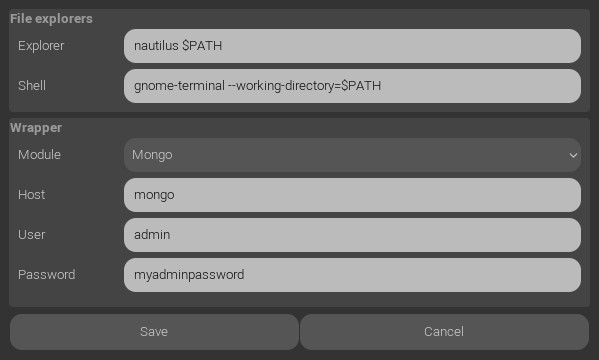
File explorers
First and second lines are commands used to open an explorer and a shell at a node location. By pressing E or T in a graph with a selected node, this commands will be executed with the text $PATH (without quotes) replaced by the node folder path.
Wrapper
Mangrove seeks in its executable folder to find python scripts named mgvWrapper*.py
The files found will be displayed in this section to let you choose one.
Wrapper parameters :
- Host: IP address or computer name
- User: a user name that can access to the database
- Password: its password
NoServer has a special treatment. Set a folder path where mangrove will store projects data files.
Which server should I use ?
We highly recommand to use a mongo database.
The neo4j wrapper haven’t been fully tested and is significantly slower. We have put it here for an example of a different database use.
The NoServer can be used for a very limited amount of users or for testing purpose. But a lot of simultaneous file accesses may result in critical data loss.
Building your own wrapper:
Duplicate mgvWrapperMongo.py and rename the “Mongo” part.
Replace each function body by your code.
Don’t modify input arguments or returning data structure, or you will have to modify Mangrove mgvUI and mgvApi modules as well.